
Narration to camera
A script read in the delivery you chose, lip-synced to the take.

Questa pagina è disponibile in italiano.Continua in italiano
Cette page est disponible en français.Continuer en français
Esta página está disponible en español.Continuar en español
Diese Seite ist auf Deutsch verfügbar.Auf Deutsch fortfahren
Audio & Voice
Voice-over, narration, dialogue and music, generated with the video or on their own — and delivered in 90+ languages.
Read to camera, seated in conversation, or laid over a demo — in the delivery you chose, and again in the language the market speaks.

Two clips where the voice is the point, and the workspace it comes out of. Turn the sound on.
A script read in the delivery you chose, lip-synced to the take.

Seated, conversational, two voices if the script needs two.

The explainer read, timed to the overlays rather than laid under them.
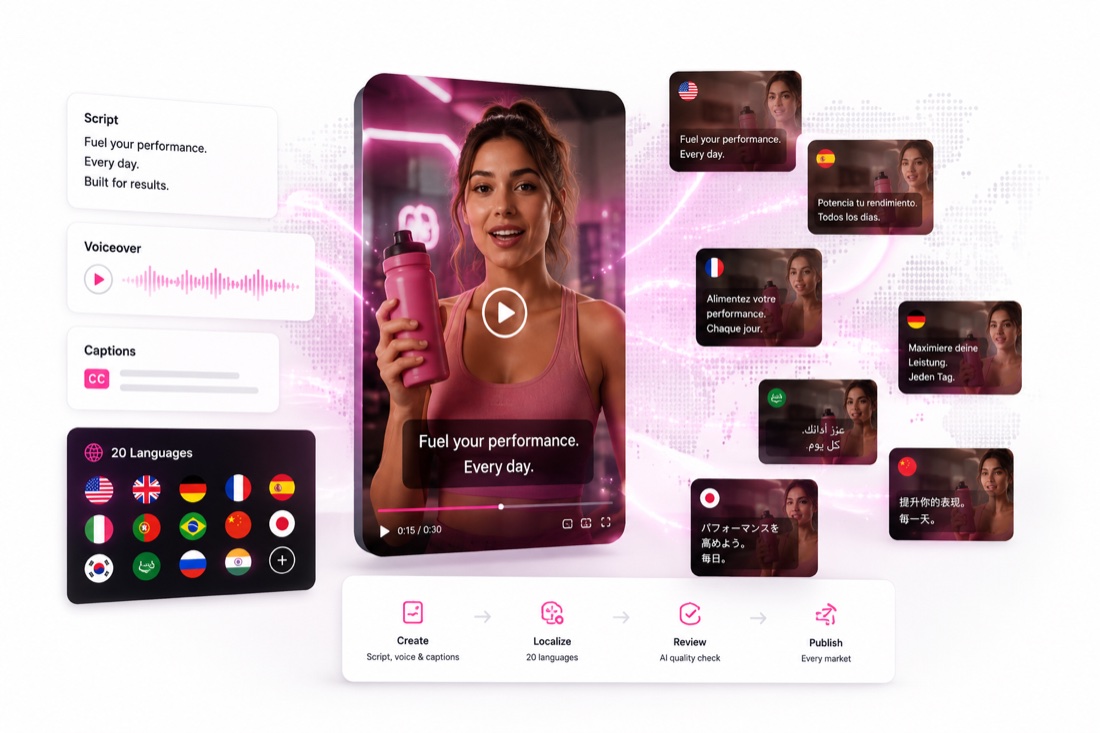
Not subtitles. The line delivered again, in voice, for that market.
Also from the same brief: Songs, Jingles, Soundtracks, Background music, Spoken explainers and Talking characters.
Speech and music are different decisions with different controls. Both sit next to the video they belong to.
How it works
Paste it, or have Covely write it to a length.
By listening, not by reading a list of names.
Pace, warmth, and where the emphasis lands.
Voice and delivery in 90+; on-screen text in 20.
Or on its own, if audio is all you came for.
Voice and delivery in over ninety languages; copy, subtitles and on-screen text localised for twenty.
No face and no voice enters the platform without documented permission from the person it belongs to, and generating a real person's likeness without their consent is prohibited.
Voice and speech delivery is available in 90+ languages. Localization of copy, subtitles and on-screen text is offered for 20 languages.
Image: Google Nano Banana Pro, Flux, Ideogram, Seedream. Video: Google Veo, Kling, Runway, Sora, Seedance. Voice: ElevenLabs. Covely selects one per step by default, and the choice can be overridden.
Credit-based plans in US dollars, starting at 59 dollars a month for 400 credits, with Starter, Growth and Scale tiers. Paying four months up front takes 15% off and twelve months takes 30%. Credits are spent per output, and the pricing page lists what each output costs.
Open Covely, pick a creator, paste a script. The workflow is already built.
This site runs on what it needs to work, and nothing else is on by default. If we add analytics or marketing measurement later, your choice here is what decides whether they run. Cookie Policy